Picking EHR software for an optometry practice sounds straightforward until you are actually doing it. The market is crowded, most platforms look similar in a demo, and the differences that matter most day-to-day are not the ones that show up on a feature comparison page.
This checklist covers what to actually evaluate across clinical workflows, equipment integration, dispensing, recall, reporting, and security, and includes the questions worth putting to any vendor before anything is signed.
Why Generic EHR Software Usually Falls Short for Optometry
Optometry EHR software is an electronic health record system built specifically for eye care practices. It supports workflows such as eye and medical histories, exam documentation, vision prescriptions, equipment integration, and recall management. A lot ofEHR software on the market was built for general practice or hospital settings and extended to cover specialty clinics, and optometry is frequently at the end of that list.
The result is a system where the core clinical record is built around general consultation notes, and optometry-specific workflows (contact lens fittings, spectacle prescription management, sales records, complex benefit calculations and inventory, recall by examination type, marketing by past purchase history) are treated as add-ons or workarounds. Clinicians adapt their documentation habits to fit the system rather than the system fitting how they actually work. So, the issues compound: slower exams, inconsistent records, staff working around the software rather than with it.
The question to ask of any platform is not whether it can handle optometry, but whether it was designed for it.
EHR Software Requirements: The Full Checklist
The checklist below covers eight requirement areas, each with specific questions to test during a vendor demo.
Working through them in order gives a clearer picture of how well any platform fits the way the practice actually operates, starting with the area that tends to reveal the most about a system’s optometry-specific design.
1. Clinical Workflow Fit
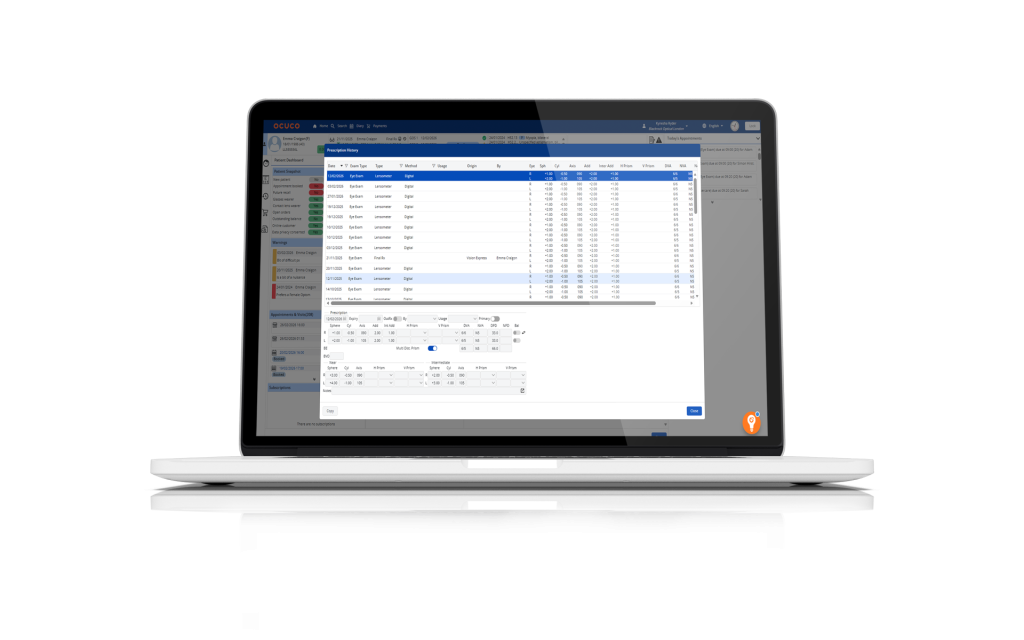
The exam workflow is the core of any optometry EHR. It should reflect how optometrists actually document: pre-test data coming in from equipment, patient ocular history, medical history, medications/allergies, family ocular history, configurable exam templates by visit type, and a clear path through to dispensing or follow-up.
| Requirement | What to Check |
|---|---|
| Configurable exam templates by visit type | Can workflows be set up separately for routine exams, contact lens fits, paediatric eye exams, and referral appointments, or is there a single template the practice adapts? Could my doctor set up their own personal template as well? |
| Pre-populated fields from equipment | Do diagnostic readings flow directly into the patient record, or is data entered manually? |
| Mixed consultation types in the same diary | Can the system handle private, insurance, and public/government plans (e.g., MC, MD,NHS, HSE) side by side without separate workarounds? |
| Configurable clinical documentation | Can clinicians add custom fields, sections, or visit-specific documentation without vendor involvement? |
| Audit trail on clinical records | Does the system log who accessed or changed a patient record and when? |
2. Equipment Integration
Equipment integration is consistently under-evaluated at the buying stage. If auto-refractor readings, OCT outputs, or visual field results do not flow directly into the patient record, someone is manually transcribing them. That increases error risk and creates a time burden that accumulates across every exam, every day.
Before committing to any platform, list every device your practice currently uses and confirm, with specific documentation from the vendor rather than a general assurance, that the integration exists and is actively maintained.
| Requirement | What to Check |
|---|---|
| Published equipment integration catalogue | Does the vendor maintain a list of confirmed, tested integrations, or does it describe integration as “available on request”? |
| Direct data import from diagnostic devices | Do readings from specific devices used in the practice flow automatically into the right patient record field? |
| Active integration maintenance | How are new devices added to the catalogue? Is there a dedicated team managing this? |
| Confirmation of specific devices | Can the vendor confirm in writing that each device currently in the practice is supported? |
3. Dispensing and Optical Inventory Management
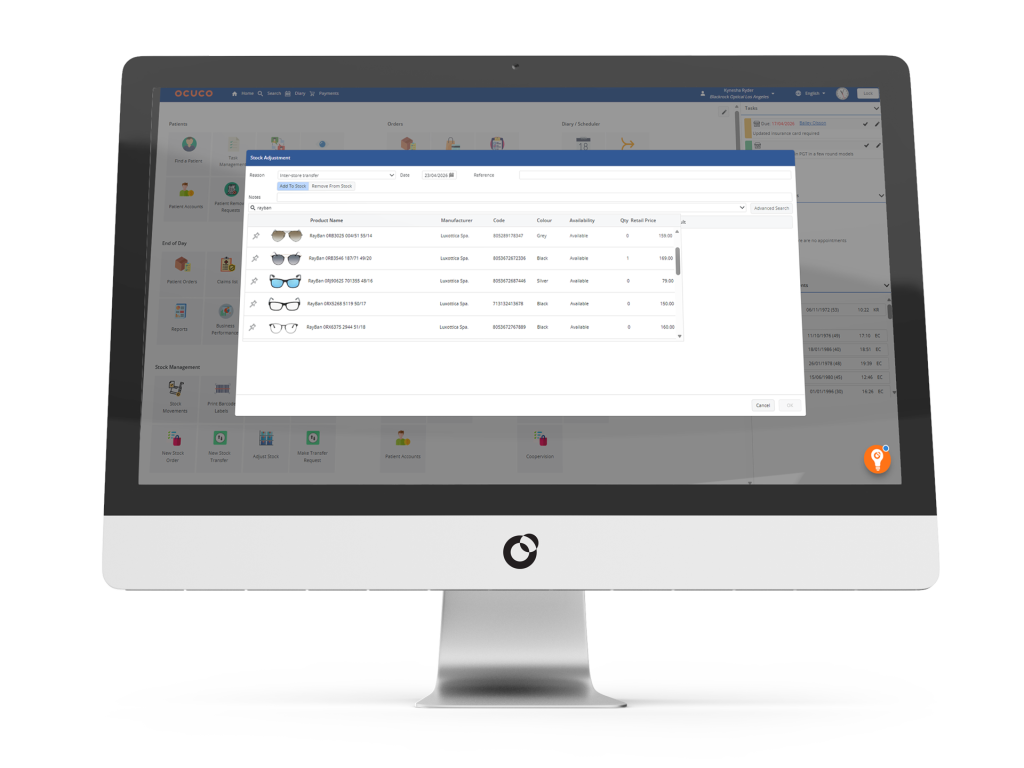
For most optometry practices, dispensing is where the clinical visit becomes a retail transaction. The EHR system should handle that handoff cleanly: prescription data flowing through to the dispensing record without re-entry (including doctor recommendations), frame and lens inventory tracked in real time, and lab orders generated from within the system.
The right inventory management layer for frames, lenses, and contact lenses does more than track stock: it connects what is on the frame boards to what is being ordered, what is outstanding at the lab, and what has been collected.
| Requirement | What to Check |
|---|---|
| Prescription data flows directly to dispensing | Does the spectacle/contact lens Rx created during the exam appear automatically in the dispensing record, or is it re-entered? |
| Frame and lens inventory in real time | Is stock updated as items are dispensed, ordered, and received, or is there a separate stock-count process? |
| Lab order management within the system | Can lab orders be raised, tracked, and marked as complete from within the EHR without switching to another platform? Can the system schedule or automatically send orders out for fulfilment and receive status messages back from LMS software to provide up to date order information in the application? |
| Validated dispensing | Does the system check whether a specific frame and lens combination can be produced before the order is placed? |
| Multi-site stock visibility | For practices with more than one location, is stock visible and manageable across all sites from a single view? |
4. Recall and Patient Communication
Recall is primarily a clinical continuity function, not a marketing one. Patients who do not return for their next examination may have conditions that are not being monitored as intended. A capable recall system in optometry should support different recall intervals by examination type, automated multi-channel outreach, tracking of who has and has not responded, and online booking links within recall templates.
Reducing no-shows through automated reminders also has a direct financial impact: practices running structured protocols for reducing no-shows in optometry recover appointment slots that would otherwise be lost. For practices operating across the US, recall workflows also need to be structured around patient communication compliance requirements, which go beyond standard GDPR obligations in terms of how patient data can be used in outreach.
| Requirement | What to Check |
|---|---|
| Recall intervals by examination type | Can different recall timers be set for routine exams, contact lens reviews, and condition-specific follow-ups, or is there a single universal recall cycle? |
| Multi-channel automated outreach | Does the system send recalls across email, SMS, and letter, or is outreach manual? |
| Response tracking | Can the practice see who has responded to a recall, who has booked, and who has not engaged? |
| Online booking integration in recalls | Do recall messages include a direct link to the online booking diary? |
| Centralised recall management for multi-site | For practices with multiple locations, can recall activity be monitored centrally (including shared templates and consistent recall rules across sites), rather than managed separately per site? |
5. Reporting and Business Intelligence
Practices that can see their own performance data clearly make better operational decisions than those relying on intuition and end-of-month guesswork. What matters is having dashboards configured for the KPIs that matter most in optometry from the outset, the ability to drill down by site or clinician, and export capability for accountants or practice owners.
For practices with more than one location, Power BI integration is a major plus: it consolidates performance data across sites in a way that simple built-in reports struggle to replicate.
| Requirement | What to Check |
|---|---|
| Optometry-specific KPI dashboards | Are the default reports built around metrics that matter in optometry (recall conversion, exam volume, revenue by line, no-show rate), or are they generic? |
| Drill-down by site and clinician | For multi-site practices, can performance be viewed at group level and broken down by location or individual clinician? |
| Custom report building | Can the practice build reports against its own data, or is it limited to the vendor’s default outputs? |
| Real-time data access | How frequently do dashboards refresh (real-time/near real-time, hourly, daily)? Is there a reporting delay? |
6. Security and Compliance
Data security in an optometry practice is a regulatory obligation. Any system handling patient records in the UK needs to demonstrate GDPR and Data Protection Act (DPA) compliance. In the US, HIPAA applies. ISO 27001 certification and SOC 2 Type II report are the clearest signals that a vendor’s security controls have been independently audited rather than self-assessed.

In addition to the certifications, the system should maintain a full audit trail, support role-based access controls, and provide security documentation on request.
| Requirement | What to Check |
|---|---|
| ISO 27001 certification | Does the vendor hold a current ISO 27001 certificate covering the service you’ll be using, and can it be shared on request? |
| SOC 2 Type II certification | Has the vendor completed a SOC 2 Type II certification, which covers a period of time rather than a point-in-time assessment? |
| GDPR and DPA compliance | Does the vendor provide a data processing agreement, and can it confirm how patient data is stored and processed? |
| Full audit trail | Does the system log record views and edits (who/when/what changed), and can the practice access/export the audit log? |
| Role-based access controls | Can access to clinical records, financial data, and reporting be restricted by user role? |
7. Cloud vs On-Premise Deployment
For most new deployments, this is increasingly a settled question. Running a fully cloud-based optometry system significantly reduces the need for on-site server hardware, eliminates much of the local IT maintenance burden, and allows the team to access records from any device with an internet connection. For multi-site practices, that matters from day one: staff can access the same patient record across locations without a VPN or separate system login.
The main consideration is internet dependency. A backup connection (a mobile hotspot or a secondary broadband line) addresses the most common failure scenario at relatively low cost.
The transition itself is also less disruptive than it sounds when the migration is planned properly.
| Requirement | What to Check |
|---|---|
| Cloud deployment with no local server | Is the system fully cloud-based, or does it require on-site hardware for any part of its operation? |
| Multi-device access | Can staff access the system from desktops, tablets, and smartphones without additional licences per device? |
| Automated backups | Are patient records backed up automatically and stored securely off-site, or is the practice responsible for managing its own backups? |
| Failover infrastructure | What happens if the vendor’s servers experience downtime? Is there a documented failover process? |
| Data residency | Where is patient data physically stored (including backups and disaster recovery), and can the vendor confirm in writing that this meets your data residency requirements and regulatory obligations? |
8. Onboarding, Training, and Support
Software that is technically capable but poorly implemented does not deliver its benefits. According to EHR failure data compiled by EHRinPractice, around 20% of EHR installations could be considered a failure, with poor implementation planning commonly cited as a root cause. When evaluating vendors, ask specifically what the onboarding process involves, what the typical timeline from contract to go-live looks like, and what support is available once the practice is live.
Practices that go through a structured implementation process including data migration support, role-specific training, and a sandbox environment for practice before go-live, reach full proficiency faster and with less disruption.
Working through a structured EHR migration checklist before committing to a timeline helps surface migration risks before they become problems mid-implementation.
| Requirement | What to Check |
|---|---|
| Data migration from existing system | Does the vendor handle data migration, what data is included (clinical notes, images, recalls, dispensing and billing history), and what format does the existing data need to be in? |
| Role-specific training | Is training structured separately for clinical staff, dispensing staff, and administrative teams, or is it a single generic session? |
| Sandbox environment | Is there a practice version of the system available before go-live so staff can make mistakes without affecting real records? |
| Ongoing support hours and channels | What are the support hours and channels (phone/email/ticket), and is phone support available during clinic hours? |
| Response time for urgent issues | What is the committed response time for a system issue that affects patient care during a clinic session? |
Questions to Ask Any EHR Vendor
The requirements above shape what to evaluate. The questions below are the ones to put directly to any vendor during a demo or sales process, before a contract is signed.
Vendor fit
- How long have you been in the industry, and what is your ownership/financial stability profile?
- Which geographies are you actively selling and supporting in today?
- What types of clients do you most commonly support (independent practices, multi-site groups, enterprise; optometry vs ophthalmology)?
- Are you focused only on eye care, or is eye care one vertical among others?
- Beyond software, do you participate in any other part of the buying cycle (e.g., lab, optical products, payments/financing, marketing)? If yes, how do you manage any conflicts of interest?
Workflow & integrations
- Can you walk through a full eye exam workflow from check-in to dispensing, using our actual visit types rather than a generic encounter?
- Which specific diagnostic devices currently used in our practice are confirmed integrations, and can you provide documentation?
Risk, rollout & support
- Can you share your ISO 27001 and SOC 2 Type II certificates and your data processing agreement?
- How is data migrated from our current system, and what is the expected timeline from contract signing to go-live?
- What is your average response time for support requests, and what happens if there is a system issue during clinic hours?
- Can you connect us with a practice of similar size and setup that has been live on your system for at least 12 months?
What the Decision Actually Comes Down To
Industry data puts the optometry EMR market at USD 1 billion in 2024, projected to reach USD 1.49 billion by 2031 at a CAGR of 13.2%. The growth tracks a shift that is already visible at practice level: purpose-built software can handle patient volume more efficiently, produces fewer documentation errors, and gives practices clearer visibility intohow the business is performing.
The EHR choice shapes how clinical teams document, how patients experience their journey from booking through to follow-up, and how clearly a practice can see its own performance. Getting it right means choosing something built for optometry rather than adapted to it, and being realistic about the implementation work required to make any system work well in practice.
The requirements in this checklist cover the areas where the right platform makes a measurable difference: fewer manual steps between exam and dispensing, equipment readings that flow into records rather than being transcribed, recall that runs automatically rather than manually, and reporting that reflects what is actually happening across the business. The wrong platform creates friction at each of those points, and that friction compounds over time.
For practices at the stage of evaluating what a purpose-built optometry EHR looks like in practice, a demo with Acuitas 3 is the most direct way to test it against your specific workflows.