Choosing the right EHR software is one of the most consequential decisions an optometry practice owner will make. Unlike general healthcare systems, optometry EHRs need to support highly specific clinical workflows, including detailed eye exams and vision prescriptions, and imaging and ongoing patient history tracking.
Electronic health records for eye doctors work differently than the EHR systems built for general medicine, and that difference is what this guide walks through.
On top of that, your software needs to integrate with diagnostic devices like OCT scanners, fundus cameras, digital slit lamps, visual fields, auto-refractors, lensmeters, dispensing aids, which is something many generic EHR platforms struggle to handle effectively.
This guide focuses on the points that matter when comparing optometry EHR solutions, helping you evaluate your options better and avoid costly mismatches down the line.
Why Generic EHR Software Usually Falls Short for Optometry
What is optometry EHR software? It is an electronic health record system built specifically for eye care practices, supporting workflows such as eye and medical histories, exam documentation, vision prescriptions, equipment integration, dispensing, and recall management. Generic EHR platforms are not designed to handle these optometry-specific workflows natively.
Most EHR software on the market was built for general practice or hospital settings and then extended to cover specialty clinics, and unfortunately, optometry is often at the end of that list.
This means you’ll get systems where the core clinical record is built around general consultation notes, and optometry-specific workflows (such as contact lens fittings, spectacle prescription management, dispensing records, recall by examination type) will be treated as add-ons or workarounds.
This creates issues. Clinicians adapt their documentation habits to fit the system rather than the system fitting how they actually work. So, the issues keep stacking up: slower exam output, inconsistent records, staff working around the software instead of with it.
The question to ask of any platform is not “can it handle optometry?” but “was it designed for it?”
EHR is just one piece of the puzzle, and it works best when it’s part of a broader evaluation of optometry practice software programs that cover scheduling, billing, and patient records.
Comparing optometry practice management systems and electronic health record features side by side makes the gap clear: generic platforms track visits, while optometry-specific systems track refractions, contact lens fittings, and ocular history in the same record. This is why eye care practices generic EHR software challenges tend to repeat across different vendors, the software wasn’t built around eye care workflows to begin with, so practices end up working around it rather than with it.
Eight Things Worth Evaluating in an Optometry EHR
Forget feature checklists. What matters is how well the system supports the way your practice actually operates day to day.
The following criteria will help you cut through generic functionality and assess whether an EHR is truly aligned with the realities of optometry, starting with the most critical factor:
1. Clinical workflow fit
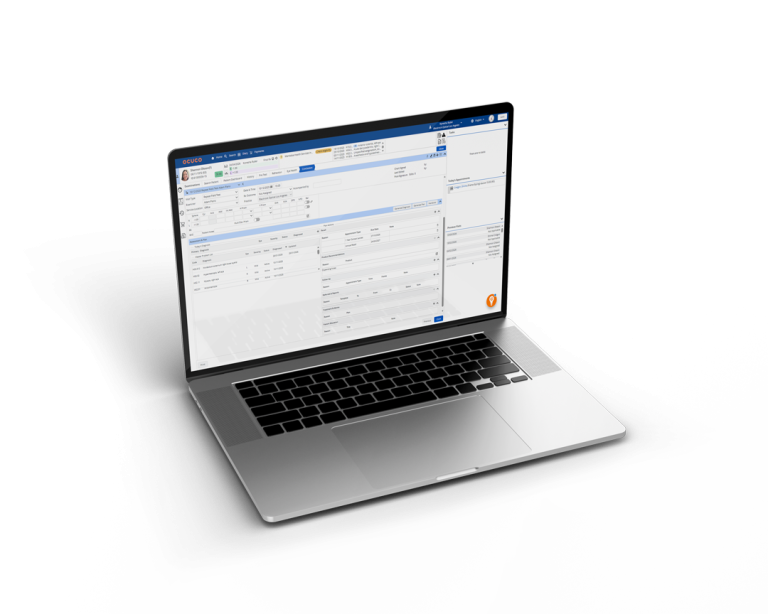
The exam workflow is the core of the system. It should reflect how optometrists actually document: pre-test data coming in from equipment, patient eye history, family histories, configurable exam templates by visit type (routine, contact lens, hospital referral, paediatric), and a clear path through to dispensing or follow-up.
Things to check: Can you configure workflows by visit type, or is there a single template you adapt? Does the system support pre-populated fields from diagnostic equipment? How does it handle mixed consultation types: private, NHS, insurance, in the same diary?
Specialty clinical needs
Top EHR systems for glaucoma specialists need IOP and VF tracking built into the chart, not bolted on, so trend lines are visible at a glance rather than pulled from separate reports.
Color vision testing software EMR integration matters for the same reason, results should attach directly to the visit record instead of living in a standalone device export.
What counts as the best ophthalmology EHR software for a private practice usually comes down to how well these specialty data types fit into the same workflow used for routine exams, rather than requiring a separate system for specialty care.
2. Equipment integration
This is frequently under-evaluated at the buying stage and overestimated as a problem to fix later. If your auto-refractor readings, OCT outputs, or visual field results do not flow directly into the patient record, someone is manually transcribing them. That is a source of error and a time cost that adds up across every exam, every day.
Before committing to any platform, list every device your practice uses and confirm (with specific documentation from the vendor, not a general assurance) that the integration exists and is actively maintained.
3. Dispensing and stock management
For most optometry practices, dispensing is where the clinical visit becomes a retail transaction. The EHR should handle the handoff cleanly: prescription data flowing through to the dispensing record without re-entry, frame and lens inventory tracked in real time, lab orders generated from within the system.
If dispensing lives in a separate system that requires data to be manually re-entered, you have a fragmented patient record and a process that is error-prone at exactly the point where errors are most costly.
4. Recall and patient communication
Recall is not a marketing function, it is a clinical continuity function. Patients who do not return for their next examination are patients whose conditions are not being monitored.
A capable recall system in optometry should support:
- Different recall intervals by examination type (not a single universal timer)
- Automated multi-channel outreach
- Tracking of who has and has not responded
- Online booking portal link within recall templates
- Automated appointment reminders
Another benefit: reducing no-shows, which automatically translates to less money lost.
Which EHR platforms for ophthalmology practices have a patient communication tool often comes down to more than recall reminders alone, some also handle appointment confirmations, post-visit follow-ups, and secure messaging from within the same record.
What software do optometry practices use to communicate with patients varies by size and specialty, but the practices with the fewest no-shows tend to be the ones where communication is built into the EHR rather than handled through a separate app.
5. Reporting and business intelligence
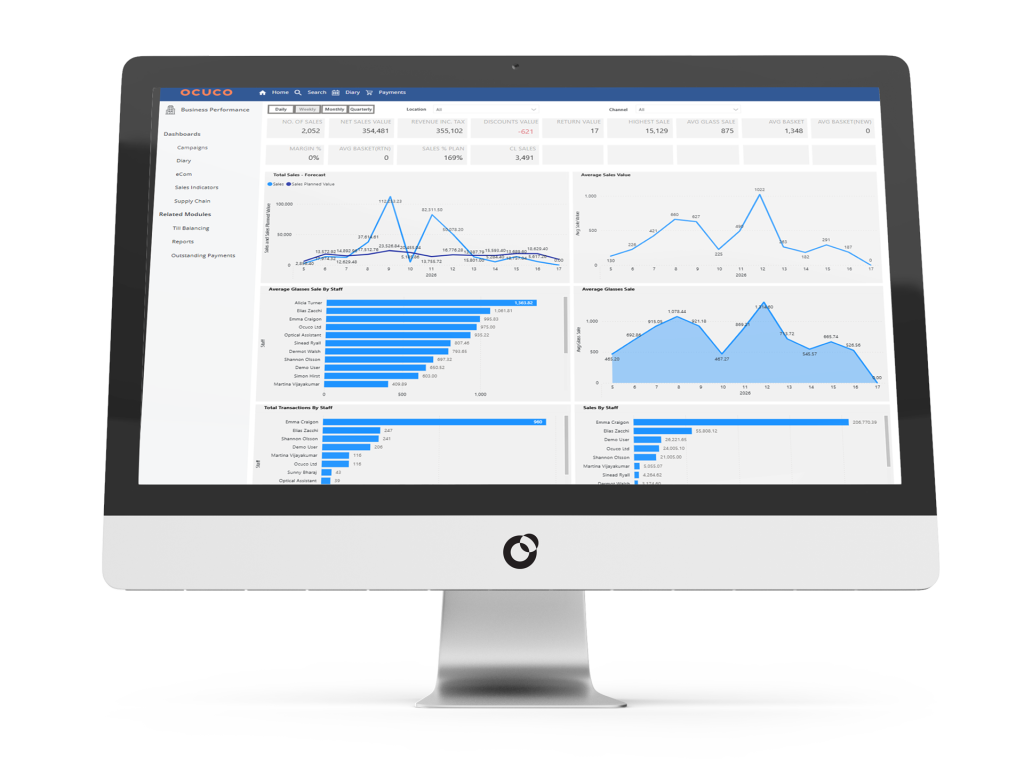
Practices that can see their own performance data clearly: appointments, recall conversion, revenue by line, no-show rates, make better operational decisions than those relying on intuition and end-of-month guesswork.
What to look for: dashboards that are configured for optometry practice KPIs out of the box, the ability to drill down by site or clinician, and export capability for your accountant or business owner. Power BI integration is becoming a differentiator for practices with more than one location.
6. Security and compliance
Data security in an optometry practice is a regulatory obligation, not an optional extra. Any system handling patient records in the UK needs to be able to demonstrate GDPR and DPA compliance.
For example in the US, HIPAA applies. ISO 27001 and SOC 2 Type II certifications are the clearest signals that a vendor has had their security practices independently audited, not just self-assessed.
Beyond certifications: does the system maintain a full audit trail? Can you see who accessed or changed a patient record and when? Role-based access controls, so that reception staff cannot view clinical notes they have no reason to access should be standard, not a premium add-on.
7. Cloud vs on-premise
This is increasingly a settled question for new deployments, but it is worth understanding what you are choosing. A cloud-based system removes the server hardware, the local IT maintenance burden, and the single point of failure in the back office. Your team can access records from any device with a connection, which matters for multi-site practices and anyone reviewing notes remotely.
The main consideration is internet dependency. A backup connection (a mobile hotspot or a secondary broadband line) addresses the most common failure scenario at relatively low cost.
If your practice is in an area with genuinely unreliable connectivity, that is worth factoring in, but for most practices the operational benefits of cloud outweigh the connectivity risk. Transitioning to a cloud-based software isn’t as complex as it sounds, and the benefits outweigh the only potential issue – occasional Internet downtime.
8. Onboarding, training, and support
Software that is technically capable but poorly implemented does not deliver its benefits. When you are evaluating vendors, ask specifically: what does the onboarding process involve, what is the typical timeline from contract to go-live, and what support is available once the practice is live?
Practices that have a structured implementation process: data migration support, role-specific training, a sandbox environment for practice before go-live, reach full proficiency faster and with less disruption than those left to figure things out independently.
EHR software for small optometry practices matters just as much on the onboarding side as it does on features, a system with a heavy, drawn-out rollout process can stall a small team for weeks in a way a larger practice with dedicated IT support wouldn’t feel as sharply.
Questions to Ask Any EHR Vendor
| Area | Question |
|---|---|
| Clinical fit | Can you show me a full eye exam workflow from check-in to dispensing, including how equipment readings come through? |
| Compliance | Can you share your ISO 27001 or SOC 2 certification, and your data processing agreement? |
| Integrations | Which diagnostic devices do you have confirmed integrations with, and can you show me documentation? |
| Migration | How do you handle data migration from my current system, and what format does my data need to be in? |
| Support | What is your average response time for support requests, and what happens if there is an urgent system issue during clinic hours? |
| References | Can you connect me with a practice of similar size and model that has been live on your system for at least a year? |
What You Are Actually Deciding
The EHR choice shapes how your clinical team documents, how patients experience their journey from booking through to follow-up, and how clearly you can see your own practice performance.
Getting it right means choosing something built for the specialty, not something adapted to it, and being realistic about the implementation work required to make any system work well in practice.
If you are at the stage of evaluating what a cloud-based optometry EHR looks like in practice, it is worth seeing a platform that was built for eyecare from the ground up rather than extended from a generic starting point.
Book a demo to see how Acuitas 3 handles HIPAA-compliant EHR software in practice, from patient records to communication tools, before making the switch.