Switching your optometry EHR is a high-stakes operational change that touches every part of your practice: clinical workflows and patient records, billing, reporting, and day-to-day team efficiency.
Without a structured approach, migrations can quickly lead to data gaps, workflow disruption, and frustration for teams adjusting to a new system.
A successful transition depends on more than choosing the right software. It requires careful planning, clear ownership, and a realistic understanding of what happens before, during, and after go-live.
This 10-step checklist walks you through each stage of the process, helping you reduce risk, maintain continuity of care, and set your team up to adopt the new system with minimum disruption.
What Makes an EHR Migration Go Wrong
Most failed or disrupted migrations share the same root causes: data that was not cleaned before importing, integrations that were not confirmed until after contract signing, configuration that was rushed, and teams that were not trained before go-live day.
The steps below are ordered the way they are because sequence matters. Skipping ahead (or treating the technical and the operational as separate workstreams) is where things start to unravel.
Work through them in order and the process is manageable. Most single-site independent optical practices complete a well-planned migration in eight to sixteen weeks from contract to go-live.
Step 1: Confirm Your Reasons for Switching
Before anything else, get clear on what you need the new system to do that your current one cannot.
Common drivers include ageing on-premise hardware that requires replacing, the need for multi-site access, compliance pressure, or a platform that has simply stopped receiving meaningful updates. If you’re switching away from Eyefinity specifically, our Eyefinity EHR alternative guide breaks down what to compare. Understanding the gap between cloud and on-premise systems helps sharpen this thinking.
Write down two or three specific problems the new system must solve. These become your evaluation criteria and your benchmark for success post-go-live.
Step 2: Audit Your Current Data
You cannot plan a migration without knowing what you are migrating. Pull a report from your current system covering:
- Total number of patient records
- Date range of active records (typically the last three to five years)
- Volume of archived or inactive records
- Any data held outside the main EHR (images, legacy databases, separate recall systems)
Most practices discover they are carrying duplicate records, outdated contact details, and inactive patients they have not seen in years. Cleaning this up before migration is far easier than cleaning it up afterwards. Focus on what is essential for clinical continuity; the rest can often be archived rather than migrated in full.
Step 3: Map Your Clinical Workflows
A migration is an opportunity to redesign how your practice operates, not just replicate existing processes.
Work through each stage of the patient journey: scheduling and pre-appointment communication, pre-testing, the examination itself, dispensing, billing, and recall. Note where your current system forces workarounds, where staff have built processes outside the software, and where information gets lost between steps.
A well-designed optical patient journey depends on the right data being available at each handoff. This is the point where practices should deliberately simplify friction points rather than carry old workarounds into a new platform.
Step 4: Verify Integrations
Make a list of every piece of technology your EHR currently connects to:
- Diagnostic equipment (OCT, auto-refractor, visual field devices, corneal topographer)
- Optical labs and frame suppliers
- Patient communication tools (recall, appointment reminders, review platforms)
- Billing and claims systems
- Accounting software
Confirm with your vendor exactly how each integration works before signing contracts or committing to timelines. Where a direct integration does not exist, ask what the workaround is and whether it is acceptable for your workflow. Integration gaps discovered late in a project are one of the most common causes of delayed go-lives.
Step 5: Choose a Platform Built for Optometry
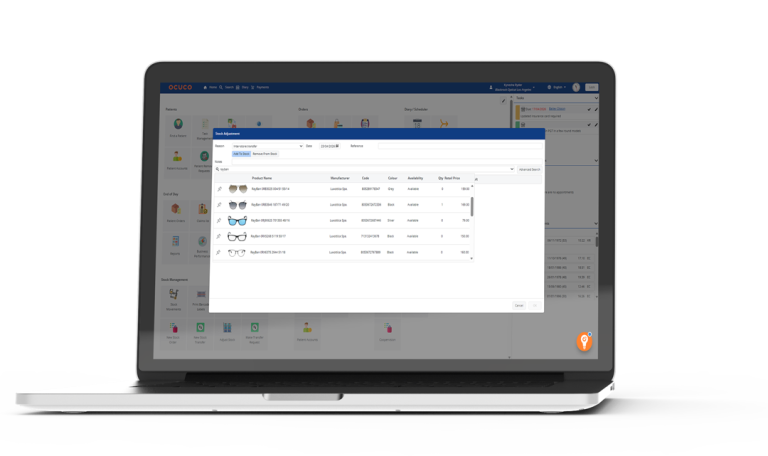
Generic healthcare EHR systems often lack the specific functionality optometry practices rely on: contact lens fitting records, spectacle prescription management, dispensing and frame inventory, GOS workflows (in the UK), and recall segmented by examination type.
Migrating to a generic platform and customising heavily tends to cost more and deliver less than starting with a purpose-built system. When evaluating options, verify:
- Does it handle the full patient journey, from pre-test, clinical notes, dispensing, without workarounds?
- Does it support your payer mix and billing model (NHS GOS, private, US insurance)?
- Does automated recall work the way your practice needs it to?
- Is data migration from your current system a supported, documented process?
Step 6: Negotiate Data Migration Terms
Data extraction from legacy systems can be more complicated than vendors initially suggest. Some older platforms make exporting records deliberately difficult; others export in formats that require significant transformation before import.
Agree in writing on:
- What format your data will be exported in (HL7 FHIR and CSV are standard)
- Who is responsible for each stage of the migration process
- How long historical records will remain accessible post-go-live
- What happens if data is lost or corrupted during transfer
Build lead time into your plan here. Waiting until the last moment to discover your legacy vendor has a six-week data export queue is a common and avoidable source of delays.
Step 7: Configure the System Before Any Data Goes In
One of the most common post-migration complaints is that the new system is technically running but does not match how the practice actually works. This happens when configuration is rushed or left until after go-live.
Before importing any patient data, set up:
- Appointment types and scheduling templates
- Examination and clinical note templates
- User roles and access permissions
- Recall intervals by exam type
- Dispensing and frame inventory categories
- Custom fields your team uses regularly
Take your time here. Reconfiguring a live system after data has been imported is harder and riskier than getting it right beforehand.
Step 8: Train Every Role That Touches the System
Training is not just for optometrists. Anyone who uses the system needs to understand it: reception staff handling scheduling and check-in, dispensing opticians working with frame and lens records, and anyone involved in billing or reporting.
Most cloud EHR vendors provide a mix of video training, live sessions, and a sandbox environment (a safe practice version of the system). Use the sandbox properly: it exists specifically so your team can make mistakes without affecting real patient records. Run through realistic scenarios: booking a new patient, recording a full examination, processing a dispensing order, and generating an invoice.
For multi-site or larger optical practices, identify a confident system champion in each location. Having someone with deeper knowledge available on the floor during the first weeks after go-live significantly reduces disruption and improves adoption.
Step 9: Validate Before You Go Live
Before switching to the new system for live patients, run a structured validation exercise using test data or a small set of historical records. Simulate a full operational day:
- Book appointments across different appointment types
- Record a complete examination with clinical notes
- Process a dispensing order with a frame and lens selection
- Generate a patient invoice or insurance claim
- Run a standard report (daily schedule, recall list, billing summary)
If anything does not behave as expected, this is the time to catch it, not on the first morning of live operations.
Step 10: Set a Clean Go-Live Date and Monitor Closely
Pick a clear go-live date and communicate it early to the whole team. From that date, the new system becomes the record of all new activity.
In the first four to six weeks, expect edge cases that did not come up during training. Have a clear process for logging issues, such as a shared document or a dedicated channel, and a named person responsible for resolving or escalating them.
Practices that approach the transition methodically typically reach a stable, confident state within four to six weeks of go-live. After that point, the operational benefits of a cloud-based optical software (faster access, cleaner data, automatic updates, reduced IT overhead) start to become part of the daily experience rather than a future promise.
A Note on Security and Compliance
Switching EHR systems is also an opportunity to tighten your data security posture. Healthcare remains one of the most targeted sectors for ransomware: US healthcare organisations lost an average of $1.9 million per day to downtime from ransomware attacks, with the total cost to the industry exceeding $21.9 billion over a six-year period.
Switching to cloud-based optical systems from reputable vendors reduces much of this risk through automatic patching, geo-redundant backups, and uptime guarantees that on-premise infrastructure rarely matches.
In the US, confirm your vendor will sign a Business Associate Agreement (BAA) before go-live. In the UK and Ireland, request evidence of UK GDPR or EU GDPR compliance as part of due diligence.
How Acuitas 3 Supports the Process
A cloud EHR migration project runs more smoothly when the platform is built specifically for optometry and optical retail, rather than a generic healthcare system adapted for eyecare.
Acuitas 3 covers clinical records, practice management,dispensing, billing, inventory, and patient recall within a single cloud-based platform designed for optical practices and optical retail environments. It supports NHS GOS workflows, private practice models, and US insurance processing without requiring separate, disconnected systems.
Migration planning, configuration, onboarding, and data conversion are treated as part of the implementation process rather than standalone technical tasks. That includes support for workflow mapping, role-based training, validation, and go-live preparation.
If you are reviewing EHR options and want to understand what a structured migration process looks like in practice, book a demo.