High-volume eyecare practices run on service volume. A busy clinic might see more than a hundred patients in a single session across a mix of appointment types: annual examinations, post-operative reviews, urgent visits, medical referrals, contact lens consultations, each with its own documentation requirements, equipment readings, and follow-up actions.
The EHR can either help the practice keep up or slow it down. If staff spend too much time on documentation, manually enter device readings, or create referral letters outside the clinical system, the software may be part of the problem, and that problem only gets worse as patient volume grows.
Here, we’ll cover the features that matter most in EHR software for high-volume eyecare, and the places where generic healthcare platforms tend to fall short of what the specialty actually requires.
The Volume Problem Most EHR Software Does Not Solve
General-purpose EHR platforms are designed for a style of clinical visit that doesn’t always fit the reality of high-volume eyecare. A typical doctor’s visit is mostly text-based (history, assessment, and plan) which allows for fairly flexible, unstructured documentation.
On the other hand, eyecare is highly structured and equipment-heavy. Every stage of the visit, from initial pre-testing and imaging to the final examination and referral, produces data that must move into the patient’s record.
If this flow is interrupted, whether by equipment that doesn’t integrate, generic templates, or a system that requires too many clicks, the entire session loses its momentum.
While this friction might be a minor annoyance for a small practice, it becomes a significant operational hurdle at higher volumes. As the pace picks up, patients face longer wait times, clinicians struggle to document accurately under pressure, and data quality begins to slip, which can negatively impact long-term patient care and clinical governance.
Clinical Documentation Built for Eye Care
The core of any eyecare EHR software is the clinical record. The real test of a platform is how well it captures the exam natively without requiring workarounds, forcing you to type notes into empty boxes instead of using structured data, or needing separate systems for different parts of the visit.
Effective documentation in ophthalmology requires structured fields for visual acuity, refraction, eye pressure, segment findings, and imaging. It should also support customizable templates for different visit types. Because a routine eye exam differs from a medical follow-up or a post-operative review, the software should adapt to how the clinician actually works rather than forcing them to adapt to a generic format.
In a high-volume practice, you must be able to adjust your workflow for every type of visit. A good template prompts you for the right information in the right order and fills in common details automatically, which lowers the mental effort needed during an exam. This speed keeps documentation moving and helps you avoid missing important details when the clinic gets busy.
Equipment Integration as a Non-Negotiable
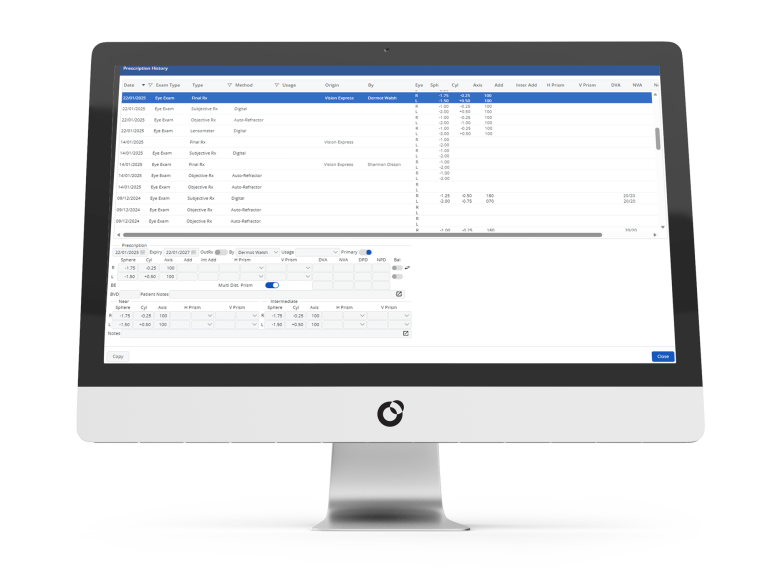
Diagnostic tools generate data that is critical for clinical decisions. When staff have to manually copy these readings into the EHR, it creates a delay and a risk of errors just when accuracy matters most.
Equipment integration is often overpromised during the sales process. A vendor saying their system “supports integrations” does not guarantee that your specific devices will connect cleanly to their platform.
Before committing to a system, list every piece of diagnostic equipment you use. Require the vendor to provide documentation that each specific integration is supported and actively maintained. For a high-volume practice, even one device that fails to connect creates a manual task that repeats with every single patient, every single day.
Patient Flow and Diary/Scheduler Management
High-volume eyecare practices usually have complex schedules. Different visits have different time needs and require specific equipment or rooms. Some doctors work at multiple locations. Some visits, like pre-op assessments, must happen in a specific order, often in succession, with different team members completing steps to prepare the patient to see their optometrist or ophthalmologist.
If an EHR handles clinical notes well but has a weak scheduling system, you will hit a different kind of bottleneck. Workarounds by the front desk, double-bookings that cause clinical risks, and schedules that don’t match how your clinic actually runs are signs that the software isn’t built for your needs.
Good scheduling in a busy practice means having appointment types with the right default times and room requirements. It means online booking that connects directly to the staff’s schedule, and better visibility that results in lower no-show rates.
Finally, it means being able to see everything: rooms, doctors, and locations at once, without having to switch back and forth between different screens and having the option to limit the view when you need to focus on one schedule specifically.
Referral and Letter Generation
Eyecare practices generate a lot of paperwork, including referral letters, discharge summaries, and updates for other doctors. In ophthalmology specifically, the referral burden is high — glaucoma suspects, diabetic retinopathy, and macula pathology all generate ongoing correspondence that needs to be accurate and produced quickly.
If your system cannot generate these letters automatically, staff often end up typing them from scratch or using separate software. This process is slow and carries a high risk of errors. When a letter is built using data already in the patient record (like their history, exam results, and diagnosis) it is much faster to create and avoids the typos that happen during manual entry.
Systems that offer template-based letters, which pull in the right information automatically, are a major asset. In a high-volume clinic, this feature saves significant time and ensures your communications remain consistent and accurate.
Recall and Patient Communication
In high-volume eyecare, recall is about booking routine check-ups, but also for managing follow-up care for patients with conditions like glaucoma, diabetes, or macular degeneration, where a missed appointment carries serious clinical risks.
An effective recall system must handle different timelines based on specific conditions or exam types. It should support automated messages through various channels and provide clear, real-time views of which patients are overdue.
To work best, this system should be built directly into the EHR, which allows your outreach to be triggered by actual clinical data, rather than just a simple contact list.
Reporting Across a High-Volume Practice
High-volume eyecare practices need reporting that goes far beyond what standard EHR systems offer. For clinical audits like tracking treatment outcomes, referral rates, or complication rates, you need to capture structured data during every visit and have tools that can analyze it properly.
On the operational side, managers need a clear view of how the practice is performing. This includes tracking patient volume, no-show rates, wait times, and revenue per clinician.
When you have real-time dashboards that allow you to drill down into specific sites or timeframes, you can make the quick, informed decisions needed to keep a busy practice running smoothly.
Security and Compliance in Eye Care Settings
Eye care practices must follow the same strict data protection rules as any other healthcare provider. This includes regulations like UK GDPR, EU GDPR, Canadian PIPEDA or HIPAA in the US, where any cloud-based EHR software should sign a Business Associate Agreement as a standard practice.
In addition to basic compliance, a high-volume practice needs specific security features. Role-based access ensures that clinical, front-desk, and administrative staff only see the information necessary for their jobs.
You also need a full audit trail that shows exactly who accessed or changed a record and when. In a busy clinic where many staff members work in the system at once, this visibility is vital for both accountability and safe patient care.
When choosing a vendor, look for ISO 27001 or SOC 2 Type II certifications. These are the clearest signs that a vendor’s security has been independently verified rather than just self-assessed.

What This Means for Software Selection
These features represent a necessary baseline for software handling the reality of a busy eyecare practice. The gap between a system that covers these areas on paper and one that functions well is wide, and it shows up during daily use, not in a sales demo.
When talking to a vendor, ask these three questions:
- Can you show me a full patient journey from booking and exams to equipment readings, dispensing, and recall, without leaving the system?
- What is your full list of supported equipment, and how can I confirm my specific devices will work?
- How do your current high-volume customers describe the documentation speed during a busy shift?
You will typically get clearer answers from a platform built specifically for eyecare than from one adapted from a general healthcare starting point.
See How Acuitas 3 Supports Eye Care Practices
Acuitas 3 brings your entire practice workflow into one integrated platform. The software is designed to be highly configurable, allowing it to match your practice’s specific operational needs.
Instead of forcing your staff to work around rigid templates or manual data entry, the system adapts to your established routines. Every step from pre-testing and exams to final dispensing and follow-up communication moves quickly and accurately.
If you are ready to remove the bottlenecks caused by disjointed software and improve your daily efficiency, we would love to show you how it works in practice.
Book a demo with Acuitas 3 to see the difference a purpose-built system makes.