
Choosing an EMR for an optometry practice is a different experience than choosing one for a general medical practice. The clinical workflows are specific: just to name a few, vision and medical exams, multiple refraction types, threshold and screening visual field testing, the complexities of contact lens fittings, fundus imaging and much more, the software needs to reflect that without requiring workarounds every time a patient sits in the chair.
But clinical fit is only part of the picture. Most optometry practices also run an optical retail dispensary, bill through federal, managed care and private insurance, manage recalls, and in many cases operate across more than one location. The right EMR needs to hold up across all of those verticals, not only the exam room.
This article covers the features that matter most, the questions worth asking before you commit, and how to tell whether a system is genuinely built for optometry or just adapted from something medically institutional and more general service-only care. Combining retail and medical care takes complexity to much higher levels.
EMR vs EHR: Worth Clarifying Before You Start
The terms get used interchangeably, but there’s a distinction worth knowing. An EMR (electronic medical record) is the digital record of a patient’s clinical history within a single practice. An EHR (electronic health record) is designed to be shared across providers and settings.
In optometry, most vendors use EHR (and most systems function as both) since patient records often need to travel between the exam lane, the dispensary, and referring physicians. When vendors say EMR, they typically mean the clinical charting and documentation side of the platform. When they say EHR, they usually mean that plus interoperability.
For practical purposes, when evaluating optometry software, treat the two as the same thing and focus on what the system actually does rather than what it’s called.
Built for Optometry or Adapted for It?
There’s a meaningful difference between software designed from the ground up for optical workflows and a general medical platform that has been configured to accommodate them.
Generic systems can cover the basics, but the gaps tend to show up in the details — exam templates that don’t map to how optometrists actually examine the patient, dispensary tools that feel bolted on, or billing workflows that don’t account for the overlap between vision and medical insurance.
Before evaluating features, it’s worth asking the vendor directly: is optometry a core market for this platform, or one of many?
The Features That Actually Matter
Not every feature on a vendor’s checklist carries the same weight. Some are genuinely practice-changing; others look good in a demo and rarely get used. The ones below are worth looking into closely because they’re where the real differences between platforms show up.
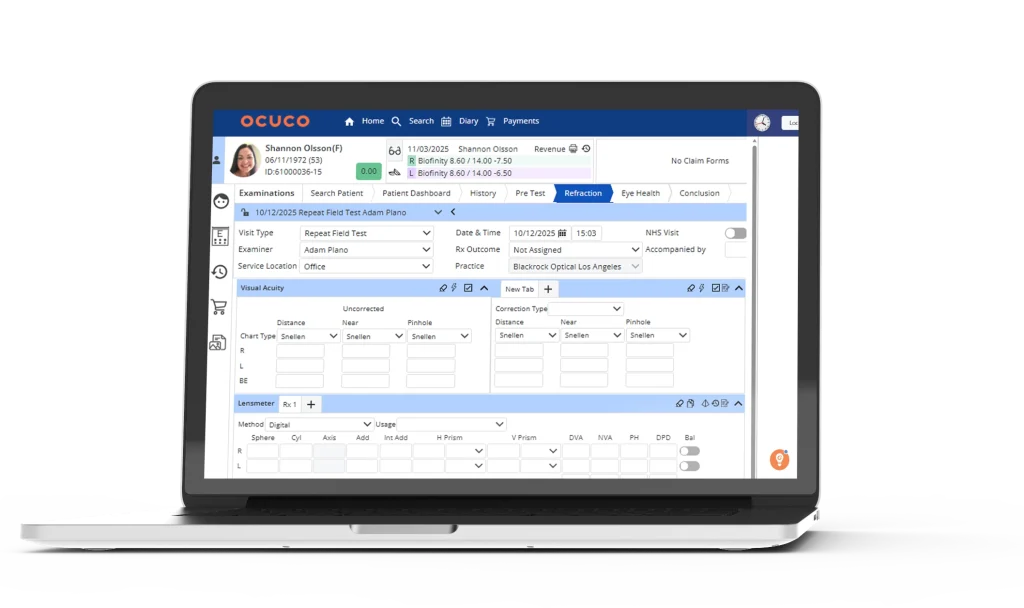
Optometry-Specific Clinical Templates
This is the first thing to check. A good optometry EMR should come with pre-built templates for routine eye exams, contact lens exams, diabetic eye exams, and pediatric assessments — not generic note templates that need rebuilding from scratch.
Ask vendors to walk you through a fully completed exam record, not just a blank template. That way, you can see exactly how the system records refraction values, captures intraocular pressure (IOP) readings, and guides users from start to finish through an eye exam. Pay attention to whether the exam flow aligns with how your clinicians actually work; if it feels like the screens were designed without real chair‑time experience, treat that as a red flag.
Diagnostic Device Integration
Time spent manually transcribing data from diagnostic equipment is time wasted, and a source of errors. A well-built optometry EMR should integrate directly with the equipment you use: autorefractors, phoropters, visual field analysers, OCT machines, fundus cameras, and tonometers.
If you’re still relying on multiple disconnected tools for exams, inventory, and dispensing, it’s worth looking at how all-in-one practice management software can eliminate software silos and give you a single view of the patient and the business.
Ask specifically which devices the system integrates with and how the data flows in. Some systems pull device data automatically into the patient record; others require manual import. The difference matters more than it sounds when you’re running a busy clinic.
Prescription Management
Prescriptions written in the exam lane should be immediately available to the dispensary for order fulfilment, without printing, re-entering, or chasing anyone down. This sounds basic, but the quality of the handoff between clinical and optical varies significantly between systems.
Check how the system handles spectacle and contact lens prescriptions, how it manages prescription history, and whether it supports e-prescribing if that’s relevant to your market. Also assess whether the PMS can automate the contact lens re-order process for patients, helping to improve convenience, retention, and recurring revenue.
Optical and Dispensary Integration
For most optometry practices, the dispensary operates as an extension of the same patient visit, not as a separate business. An EMR that treats the clinical and retail sides as disconnected systems creates friction at exactly the wrong moment.
As you shortlist systems, map them against your optometry patient journey and check whether clinical, retail, and online touchpoints are connected in a way that actually reduces friction at each stage.
At a minimum, the system should allow frame and lens orders to be placed directly from the patient record, with prescription data carried through automatically. Practices with a higher retail volume will also want to look at how well the system handles inventory, supplier ordering, insurance benefit redemptions, and POS workflows. Some systems also include validated dispensing to ensure orders form a complete pair before being sent to the lab, reducing delays caused by incorrect or incomplete order inputs.
Scheduling and Patient Communication
Appointment scheduling should do more than fill a calendar. Look for online booking capability, eligibility, the right credentialed provider, automated reminders via text and email, and recall functionality that brings patients back at the right intervals: annual exams, contact lens renewals, follow-ups for monitored conditions.
Recall in particular is worth examining closely. Some systems offer basic recall lists; others support automated campaigns with configurable messaging, as well as built-in CRM and email marketing capabilities. For a practice trying to maintain patient retention without adding admin overhead, the difference is significant.
Billing and Insurance Workflows
Optometry billing has its own complexity: vision insurance plans, medical insurance for clinical conditions, and the overlap between the two. The EMR should support both, with coding assistance that reduces claim errors and a clear workflow for managing rejections and resubmissions.
If your practice bills heavily through a specific vision network (such as VSP, EyeMed, or Davis Vision), evaluate how well the system supports that payer in particular, not just vision insurance in general. Managed vision care payers and plans require specific workflows and non-conventional portals for claims management. Differences in payer-specific integrations often show up in the time it takes to enter the order, which impacts claim turnaround time and the frequency of errors.
Reporting and Practice Analytics
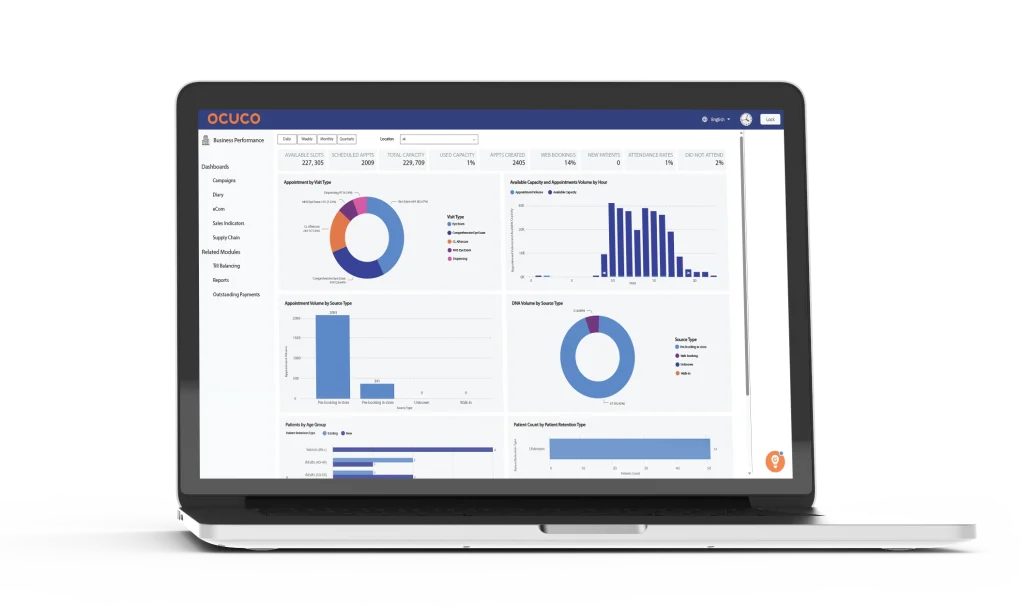
An EMR that only stores data without helping you use it is a missed opportunity. Look for reporting tools that give you visibility into clinical productivity, revenue by provider or location, recall conversion rates, and inventory performance.
The depth of reporting varies widely. Some systems offer a handful of fixed reports; others allow custom queries and dashboards. If data-driven decision making is important to how you run the practice, this is worth spending time on during demos rather than treating it as an afterthought.
Questions Worth Asking Before You Commit
Feature lists are easy to produce. The harder questions are the ones that reveal how a system performs under real conditions.
How does data migration work? Moving patient records, prescriptions, and clinical history from an old system to a new one is rarely straightforward. Ask vendors to explain the process in detail: what gets migrated, what doesn’t, how long it takes, and what it costs. Practices that underestimate this step often pay for it during go-live.
What does implementation actually look like? There’s a difference between a vendor that assigns a dedicated implementation manager and one that hands you a setup guide and a support email address. Ask who you’ll be working with, what the timeline looks like, and what training is included for clinical and front-office staff.
What happens when something breaks? Support quality is one of the most consistent complaints in EMR reviews. Find out what support is available, during which hours, and through which channels. Practices in different time zones or with weekend hours have different needs from those running standard weekday schedules.
What’s the real total cost? Monthly subscription figures rarely include everything. Ask specifically about implementation fees, training costs, per-provider pricing at different scales, and which features require add-ons. A system that looks affordable at one provider can look very different FOR another.
Does the system receive regular updates, and does it keep pace with local compliance requirements? A vendor that only updates infrequently, or that passes the responsibility for compliance changes to the practice, can create real risk over time. Ask how often the platform is updated, how changes are communicated, and whether the vendor actively maintains alignment with your local regulatory environment.
Just as important, look at the vendor’s development roadmap. An EMR that consistently evolves with new features and enhancements shows that the product is not static but designed to grow with your practice. When choosing an EMR, aim for a partner that invests in long‑term development, not just short‑term fixes.
Cloud-Based vs On-Premise
Most commonly, you’ll find cloud-based EHRs in modern optometry, and for most practices that’s the right choice: access from any device, no server maintenance, automatic updates, and easier multi-location support.
On-premise systems still exist and may suit practices with specific data sovereignty requirements or unreliable internet infrastructure. But the market has moved firmly toward the cloud, and the product investment from most vendors reflects that.
If cloud access is part of your decision, ask specifically about uptime guarantees, data backup, and what happens to your patient records if you ever leave the platform.
Single Platform vs Best-of-Breed
Some practices try to solve the clinical and retail sides separately – a dedicated clinical EMR for the exam room, a separate POS system for the dispensary. It can work, but it introduces integration complexity, duplicate data entry, and a support structure split across two vendors.
A single platform that covers clinical workflows, optical retail, scheduling, billing, and reporting removes that complexity. The tradeoff is that no single platform is the best at everything, but for most independent practices and growing groups, the operational simplicity of one system outweighs the marginal gains from stitching together best-of-breed tools.
Making the Final Call
The right optometry EMR is the one that fits how your practice actually operates, not the one with the longest feature list or the most recognisable name.
Before you go into demos, be specific about your non-negotiables: which device integrations you can’t live without, how important dispensary integration is, whether multi-location support is needed now or likely to be needed soon, and what your realistic budget looks like over a two-to-three year horizon.
Then take the same list of questions into every demo. Ask vendors to show you real workflows rather than polished tours. Ask about data migration, implementation timelines, and post-go-live support before you talk about price.
If optical retail is a significant part of your operation (or you’re building toward it) it’s worth putting a system like Acuitas 3 on your shortlist. Unlike EHR-first platforms that treat the dispensary as a secondary feature, it’s built around optical retail and practice management as the core of the system, with clinical workflows sitting alongside rather than on top.