
Most independent optometry practices are sitting on a significant amount of business intel and not using it. Every appointment booked, every exam completed, every frame sold, and every recall that goes unanswered is extra data. The question is whether your EHR is surfacing that data in a way that helps you act on it.
This guide covers the KPIs that matter most for practice growth, where to find them in your clinical and management data, and what to do when the numbers tell you something needs to change.
Why Most Practices Underuse Their EHR Data
Running a clinical practice leaves limited time for business analysis. For many independent optometrists, the result is a report that goes largely untouched: monthly revenue checked, but rarely investigated beyond the surface.
Practices that don’t track performance metrics regularly often miss problems that have been building for some time. Tracking the right numbers only works when your optical management system is capturing accurate data at every stage of the patient journey.
A modern cloud-based optometry EHR generates this data automatically. The value is in knowing which numbers to look at, how often, and what action each one should trigger.
The KPIs That Actually Drive Revenue
KPIs only make sense when they’re tied back to the goals you set out from the start, which is exactly why a clear business plan for optometry practices matters before you start tracking anything.
1. Average Revenue Per Patient in Optometry
This is the single most useful top-line metric for understanding whether your practice is capturing the full value of each patient journey.
The simplest formula is:
Average Revenue Per Patient = Total Practice Revenue ÷ Total Patient Visits
Industry benchmarks put the national average around $285 per exam visit, with top-performing practices reaching $350 or above, driven primarily by optical capture rate and medical billing optimisation.
If your revenue per patient is below benchmark, the problem is usually not the number of patients you see. It is more often a mix of low capture rate, weak product mix, and incomplete billing, and your EHR data can help you spot and fix all three.
What to look for in your EHR: Check your revenue per patient data across rolling 30, 90, and 365-day periods. Split this data by exam type (such as routine, medical, or contact lens) to pinpoint exactly where the performance gap exists.
2. Optical Capture Rate
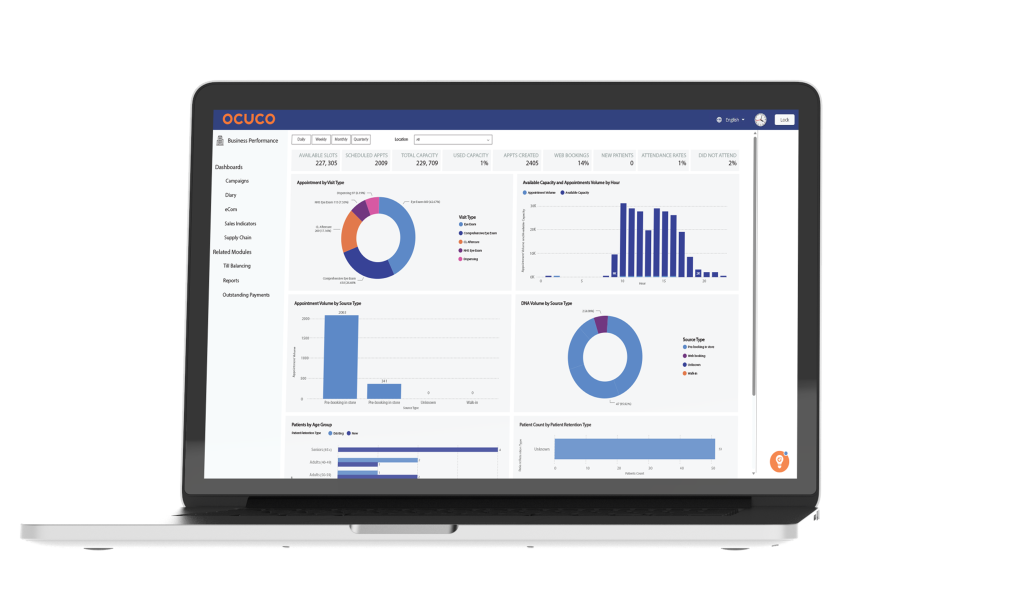
Your capture rate tracks the percentage of patients who receive a new prescription and then decide to purchase their eyewear directly from your practice. This is one of the most useful metrics to monitor in optometry, as it clearly indicates how effectively your team is managing the handoff from the exam room to the optical shop.
Industry benchmarks hover around 60–70% for capture rate, with well-run optical departments achieving 75% or higher. Each percentage point matters: for a practice seeing 2,000 patients per year, a five-point improvement in capture rate can represent a meaningful shift in annual revenue.
What to look for in your EHR: Prescriptions issued versus optical sales completed, segmented by prescribing optometrist, exam type, and time period. Where the gap between prescriptions written and purchases made is largest, the conversation needs to happen about why.
3. Recall Effectiveness
Recall serves as the engine that keeps an optometry practice sustainable. Patients who return on time provide steady revenue, stay on track with their eye health, and cost far less to retain than new patients cost to attract.
Most EHR systems let you set up recall intervals for different exam types, like routine, medical, or contact lens, while tracking who is overdue, who has been contacted, and who has booked. Your recall conversion rate is simply the percentage of those due patients who actually book a time to come in.
When conversion is low, it is usually a problem with your internal process rather than a lack of patient loyalty. If you examine the timing, sequence, and method of your reminders, you will often find easy ways to improve, such as adding one more touchpoint, updating your messaging, or reducing the amount of time between the first reminder and the next follow-up.
What to look for in your EHR: Look for a recall reporting that shows a list of patients who are overdue for an exam, broken down by type. You should also track your recall conversion rate for each contact method, such as SMS, email, or letter, and measure the average time it takes for a patient to book an appointment after you send a reminder.
4. No-Show and Cancellation Rate
Every empty appointment slot represents lost revenue that you cannot get back. If your optometry practice’s no-show rate is higher than 8–10%, it is time to look into your booking and reminder systems.
A more helpful approach is to identify which specific times are most at risk for missed appointments. Since many practices see more no-shows during Monday mornings or late-day slots, spotting these patterns helps you decide when to overbook, how to better organize your schedule, or when to send extra reminders.
What to look for in your EHR: Look for your cancellation and no-show rates based on the type of appointment, the time of day, and the day of the week. Most importantly, check whether an automated reminder was sent for those missed visits, as that one detail often explains exactly why the patient did not show up.
5. Multiple Pair and Lens Upgrade Rate
Add-on revenue from lens upgrades, such as anti-reflective coatings, photochromic lenses, blue light filters, and multiple-pair sales accounts for some of the highest-margin income in your optical department. While AR lens adoption in the U.S. is around 60%, it hits 90% in parts of Europe and Asia, which shows that most practices have a lot of room to grow.
A big part of increasing lens upgrades and multiple pair sales is understanding where the breakdown is happening in the patient journey. Sometimes the disconnect happens during the clinical handoff, where the optometrist may not be recommending a strong enough variety of options before the patient reaches the dispensing team. Ideally, the patient should leave the test room already understanding the benefits of different lens options, coatings, occupational lenses, prescription sunglasses, or additional pairs for different lifestyles and tasks. Even when there’s no prescription change, there are still opportunities for the optometrist to recommend that the patient speaks with the dispensing team, whether that’s because their coatings are deteriorating, their frame is looking worn, or they could benefit from a backup pair or workplace lenses.
On the dispensing side, the team also needs to consistently reinforce those recommendations and confidently introduce the idea of multiple pairs for different aspects of daily life. In reality, many patients could benefit from several pairs of glasses if budget allows, including an everyday pair, a backup pair, dedicated reading glasses, occupational lenses, prescription or plano sunglasses, and even sports eyewear. It’s also important not to overlook smaller add-ons and accessories, such as clip-ons, cleaning kits, eyeglass chains, and care products, as these all contribute towards increasing average dispense value as well. When the clinical and dispensing teams work together with a consistent approach, it creates far more opportunity to increase both multiple pair sales and premium lens upgrades.
What to look for in your EHR: Check the rate of lens upgrades as a percentage of your total lens sales, look at your multiple-pair ratio, and break this data down by the prescribing optometrist and the individual member of your dispensing staff.
6. New Patient Growth Rate
New patients are necessary for the long-term health of your practice, though they are also the most expensive to attract. Tracking your new patient volume as a percentage of your total visits and watching whether that number stays steady, grows, or drops, gets you an early warning about the direction your practice is headed.
If your number of new patients is falling while total visits stay the same, it usually means your retention is solid but you are not replacing the patients who leave. If you are seeing a high volume of new patients but your revenue per patient is low, focus your efforts on improving conversion and capture instead of just trying to bring in even more people.
What to look for in your EHR: Look at your ratio of new to returning patients by month, identify where your referrals are coming from, and compare the revenue generated by new patients against the revenue from your existing base.
7. Accounts Receivable and Claims Turnaround
In practices that handle multiple insurance payers, aged accounts receivable often masks a significant revenue problem. Claims that remain unpaid for more than 30 days are essentially money you have earned but not yet collected, and the likelihood of recovering those funds drops the longer they go unpaid.
You should review your accounts receivable report by segmenting it according to the specific payer and the age of the claim (such as 0–30, 31–60, 61–90, and 90+ days). If you find a large number of claims sitting in the 60+ day bracket, it usually signals a problem with a specific insurance carrier or a recurring coding error that you can fix with a more systematic approach.
What to look for in your EHR: Look for your aged receivables broken down by payer, the average number of days it takes for different claim types to be paid, and your denial rate for each payer and billing code. A properly set up practice management system should make these figures easy to find by surfacing them for you automatically.
How to Improve Efficiency in an Optometry Practice
Knowing your KPIs is only useful if it changes how you run the practice. A few principles that help:
Review at the right frequency: Some metrics (schedule fill rate, daily revenue) warrant daily or weekly attention. Others, such as recall conversion rate or lens upgrade rate, are better reviewed monthly. Annual reviews of AR ageing or new patient growth give you the trend, but not enough warning to act in time.
Share relevant data with the whole team: Capture rate involves the optometrist, but also the dispensing team. No-show rate is a scheduling metric, but it also involves the front desk. When staff can see how their role connects to a specific number, behaviour changes without requiring top-down instruction.
Set benchmarks before you set targets: Know your baseline before you decide where you want to get to. A practice that has never tracked lens upgrade rate cannot realistically target 60% in the first quarter. Establish where you are, then set a realistic improvement goal for the next 90 days.
What Your EHR Should Make Easy
Not all platforms make business analytics for eye care practices this easy to access. A purpose-built optometry EHR should give you access to these metrics without requiring manual exports or custom spreadsheets.
Look for:

Pre-built reports for capture rate, recall status, revenue per patient, and AR ageing

Filtering by time period, exam type, optometrist, and location

Billing dashboards that show claim status and payer performance in real time

Recall management tools that track contact history and conversion, not just due dates
Conclusion
If your current system requires significant manual work to extract the metrics above, that is a meaningful gap, and one that has a recurring cost in time, errors, and delayed decisions.
Acuitas 3 is built to give independent optometry and optical retail practices visibility into their performance data as a standard part of the platform, not as an add-on or an export exercise. See how Acuitas 3 supports practice growth. Book a demo.