
Optometry practices manage a high volume of clinical and operational activity every day: exams, imaging, prescriptions, follow-ups, and often optical retail too. When those pieces live in separate systems (or worse, partly on paper), you end up retyping the same info, chasing missing details, and dealing with records that don’t match across tools.
A cloud-based EHR for optometry can help by keeping clinical records, imaging, scheduling, and (where relevant) billing in one place, accessible through the internet rather than installed on a single office server.
In this guide, we’ll cover what a cloud-based EHR is, the features that matter most in day-to-day practice, common mistakes to avoid, and what to ask for in a demo.
What is a Cloud-Based Electronic Health Record (EHR) for Optometry?
A cloud-based electronic health record (EHR) for optometry is software that stores patient records online and lets your team access them securely through a web browser or app. Instead of being installed on one local computer or office server, it’s hosted in the cloud and accessed via the internet.
For optometry, a cloud EHR usually includes: clinical charting and exam templates, patient history, scheduling and recalls, electronic prescribing (where relevant and possible), imaging and diagnostic attachments, and in some cases billing and reporting tools or integrations.
In a typical practice, it’s used by owners, optometrists, dispensing teams, and admin staff; basically anyone who needs the same patient information to stay consistent from booking through follow-up.
Why Optometry Needs Specialist Cloud EHR Software
Optometry isn’t just “general medicine plus refraction.” Your records are structured and measurement-heavy (visual acuity, refraction, intraocular pressure (IOP), contact lens details, ocular history), and you often need to compare values over time quickly during an exam.
On top of that, imaging and diagnostic data needs to sit next to the clinical notes so the story of the patient is easy to see at a glance.
A specialist optometry EHR also needs to support what happens after the exam: contact lens checks, glasses workflows, recalls, and practical follow-ups that drive both care quality and revenue.
The “cloud” part matters too, because it enables secure access across consulting rooms or multiple locations, and it usually means updates and templates can be rolled out consistently without manual installations or reliance on local servers.
Core Features to Look For in Cloud EHR Software for Optometry
When you compare vendors, focus less on long feature lists and more on whether the system supports your daily flow with fewer manual steps. The goal is simple: reduce rework, reduce missed information, and make it easier for the whole team to stay on the same page.
Clinical Charting Tailored to Optometry
Optometry charting should be fast, structured, and easy to review mid-exam. Look for exam templates that match how your clinicians work, with quick access to prior visits and past measurements.
A practical example: a good EHR can prefill stable details from the last visit (like longstanding ocular history) while clearly flagging fields that need confirmation or updates.
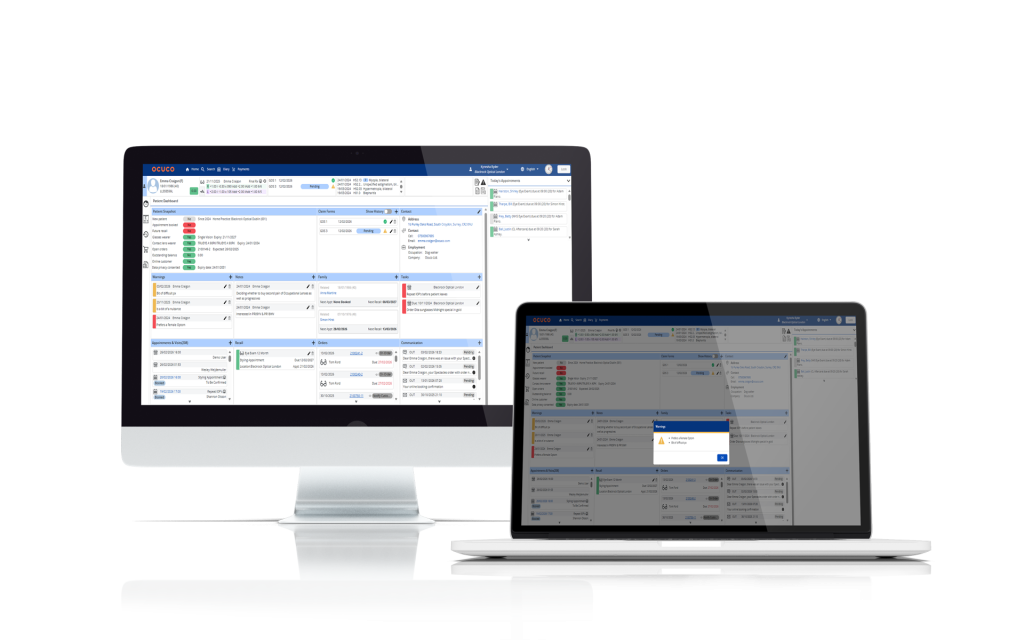
EHR system with real-time user alerts.
Imaging and Diagnostics in One Record
Your imaging and diagnostic results should attach directly to the patient record and be easy to view without jumping between systems. Check how images and test results display, how easy it is to compare over time, and which diagnostic devices or file types the EHR can connect with.
In day-to-day terms, this is the difference between “I found the scan eventually” and “I can see progression in seconds.”
Scheduling, Recalls, and Reminders
Scheduling supports how your whole day runs, from test-room capacity to who’s available at what time.
A cloud EHR should support appointment types, staff visibility of the daily workload, and recall workflows (annual eye exams, contact lens aftercares) that are easy to manage. Reminders by SMS or email help reduce missed appointments and keep follow-ups consistent without extra admin time.
If scheduling is already a pain point, it’s worth reading about the hidden costs of poor scheduling in optical practices, because those problems tend to show up again during EHR implementation if they aren’t addressed.
Billing, Claims, and Payments
Some practices want billing built into the EHR; others prefer an integration with a separate billing tool. Either way, the important part is that the workflow is clear: fewer missed charges, better tracking of what has been billed and paid, and less manual reconciliation at the end of the day.
If your team is trying to tighten up the handover between front desk, testing, and checkout, it helps to think about managing patient flow from appointment to payment as one connected process.
Reporting that Supports Decisions
Reports should be understandable to practice owners and managers, not just “data for the sake of data.” Useful reports include appointment volume, visit types, recall effectiveness, and revenue views by service type or provider, depending on what your system supports.
The key question is whether the report answers a real decision, like “Are we actually getting patients back for annual exams?” or “Where are we losing time in the day?”
Security, Permissions, and Audit Trail
Security matters, but you don’t need a wall of technical language to assess it. In practical terms, you want role-based access (so people only see what they need), secure login, and clear logs showing who changed what in a record and when.
This is especially important when multiple staff members touch the same patient file across booking, testing, exam, and dispensing.
Multi-Location Capabilities
If you have more than one location (or plan to) check how the cloud EHR handles shared templates, central configuration, and reporting across sites.
Multi-location setups often succeed or fail based on consistency: shared standards where needed, and flexibility where local teams genuinely operate differently.
As soon as you add a second site, you need the basics to stay consistent across locations (templates, permissions, reporting), which is why software for multi-location optometry practices gets discussed so often.
Common Pitfalls when Choosing Cloud EHR Software for Optometry
Most problems come from focusing on the wrong things during evaluation. A long feature list can look impressive, but it doesn’t tell you whether the software makes exams faster or slower, or whether staff will actually use it properly.
Here are practical pitfalls to watch for:
- Over-prioritising features over workflows, your team needs a clean exam-to-recall journey more than dozens of rarely used options.
- Underestimating data migration time, products, patient history, images, and templates take planning to move properly.
- Choosing templates that look good but slow exams down, if clinicians click more, they’ll resist adoption.
- Not testing imaging, recalls, or billing in a real scenario, “Yes, it has it” is not the same as “It works the way we need.”
- Treating training as a one-off event, different roles (front desk, technicians, optometrists, managers) need different training depth.
Benefits of a Cloud Optometry EHR for Your Practice
The benefits should show up in daily work, not just in the software brochure. Below is a practical table of benefits and what they typically look like in a real practice.
| Category | Benefit | How it helps your practice |
|---|---|---|
| Operations | Less duplicate entry | Staff spend less time typing the same details into multiple places and more time with patients. |
| Operations | Easier access to records | Clinicians can pull up histories, test results, and notes in seconds, even on busy clinic days. |
| Operations | Better visibility across the day or week | Everyone can see who is coming in, which tasks are pending, and where bottlenecks are forming. |
| Financial | More consistent capture of billable work | Services and products are recorded more reliably, reducing missed charges and write-offs. |
| Financial | Better understanding of which services drive revenue | Simple reports show which clinics, services, or providers contribute most to your bottom line. |
| Patient experience | Faster access to history | When records are at hand, patients spend less time repeating information and more time being examined. |
| Patient experience | Smoother visits and clearer follow-up | Recalls, reminders, and next steps are easier to manage, so patients know when to return and why. |
Many practices start their search for a cloud EHR because they want better clinical recordkeeping, but the day-to-day gains often come from the “small” things: fewer handoffs, fewer missing notes, and fewer “Where is that result?” moments.
For independent practices, this usually ties into wider discussions about practice management software for independent optometrists and how clinical, retail, and operational workflows fit together.
Buyer Checklist Before You Book Demos
This checklist is here to make internal discussions easier and keep demos focused on what matters. Write down your answers before you speak to vendors, because the best demos are the ones where you can say, “Show me how this works for us.”
Questions to Answer Inside Your Practice
Start with the basics: practice size, number of locations, and which services you offer (including optical retail if relevant). List your current pain points, like slow charting, awkward imaging workflows, recall gaps, or scheduling pressure.
Then identify the top workflows that must work well on day one, so you don’t get distracted by nice-to-have features.
Implementation and Adoption Points to Cover
Ask what data will be migrated, what won’t, and how long it typically takes. Confirm training by role, go-live support in the first weeks, and how issues are handled during the transition.
Agree on what “success” looks like in the first 30-90 days, such as improved record completeness, fewer scheduling gaps, faster recall processing, or better visibility into daily workload.
What to ask vendors to show you
A useful demo follows a full patient journey, not a random tour of menus. Ask vendors to show: booking the appointment, running the exam, adding imaging, prescribing, billing or marking services (where relevant), and setting recalls and reminders. If you also run optical retail, ask how clinical records connect to the dispensing workflow and what staff see at each step.
Conclusion
A cloud-based EHR for optometry should bring clinical records, imaging, scheduling, and (where relevant) billing together in a way that fits the reality of your day.
The best next step is to write down your requirements, shortlist a small number of systems, and ask for demos that follow your real workflows from appointment to follow-up.
If you want to see how this can work in practice, you can request a demo and walk through the workflows that matter most to your team.