Most independent optometry practices are still running systems designed for a different era. Server-based software made sense when it was the only option, but it is no longer the best one.
Cloud-based systems now account for nearly half of the entire EHR market, and adoption is growing since the operational and financial case for switching has become harder to ignore.
This guide walks through why the transition is worth doing, what to expect when you make it, and how to approach the migration without disrupting your clinical workflows or patient care.
Cloud vs On-Premise: What Actually Changes
An on-premise system stores your clinical data and software on a local server, usually a physical machine somewhere in the practice. Your team manages it, your IT provider patches it, and if something goes wrong, recovery depends on how recently you last ran a backup.
A cloud-based system moves all of that to a vendor-managed infrastructure. Your data lives on remote servers, accessed securely through a browser or app, and the vendor handles updates, security patches, and backups automatically.
For most independent optometry practices, the practical day-to-day difference is significant. There is no server to maintain, no manual update to schedule, and no single point of failure in the back office. Staff can log in from any device with an internet connection, especially useful for multi-site practices or optometrists who move between locations.
On-premise systems typically require a large upfront hardware investment, plus ongoing IT maintenance costs that cloud subscriptions absorb into the monthly fee. Cloud systems also tend to scale more cleanly: adding a second location or an associate optometrist is a matter of adding a user account, compared to reconfiguring a server.
Why Practices Are Making the Switch Now
A few converging factors have made the past few years a tipping point for cloud migration in optometry and primary care more broadly.
Ageing Hardware
Server-based systems have a lifespan. When the hardware supporting a legacy system reaches end-of-life, practices face a choice: invest significantly in new infrastructure to keep the old system running, or use that moment to move to a cloud platform. For many practices, a server refresh is the trigger that makes the transition economics obvious.
Remote and Multi-Site Access
Switching systems is a big decision, and it usually starts with a proper comparison of optometry practice management programs to find what actually fits how your team works day to day.
Post-pandemic working patterns have changed expectations around access. Optometrists who want to review records before a home visit, check notes between sites, or handle admin from outside the practice are constrained by on-premise systems in ways that cloud platforms simply are not. As more practices expand to second locations or bring in associates, the inflexibility of a local server becomes a day-to-day friction.
Security and Compliance
On-premise systems place the full burden of data security on the practice. Patches need to be applied manually, backups need to be tested, and physical security of the server room matters.
US healthcare organisations are losing an average of $1.9 million per day to downtime from ransomware attacks, a risk that affects practices with ageing on-premise infrastructure. Reputable cloud vendors now offer uptime guarantees of 99.99%, geo-redundant backups, and automatic security patching as standard.
In the US, your cloud vendor should sign a Business Associate Agreement (BAA) confirming their HIPAA obligations.
In the UK and Ireland, UK GDPR and EU GDPR respectively require that data processors meet defined security standards: any reputable cloud EHR vendor should be able to evidence their compliance posture on request.
Software That Keeps Pace
On-premise systems are updated on a cycle, often annually, sometimes even less. Cloud platforms push updates continuously, meaning new features, compliance changes, and bug fixes reach your practice without scheduling a vendor visit or an IT window. Over time, the gap in functionality between a well-maintained cloud system and an aging on-premise installation tends to widen in ways that affect clinical efficiency and patient experience.
What to Prepare Before You Migrate
The transition to a cloud-based EHR is a project, not a switch you flip. Practices that approach it with a clear plan and realistic timeline have smoother experiences than those who treat it as a purely technical exercise. If you’re planning a broader software change, our guide to transitioning your optical software covers the full process.
Here is what to work through before you start.
Audit Your Current Data
Before migrating, get clear on exactly what you are moving and why. How many active patient records do you hold? How much patient data do you actually need to bring across?
In most cases, core clinical records will be migrated in full, as they are required for continuity of care. The real opportunity is in cleaning up what sits around that data.
Most practices discover they are carrying significant volumes of inactive or duplicate patient records, along with outdated contact details or unused entries. Tidying this up before migration reduces complexity, improves data quality, and avoids carrying unnecessary clutter into the new system.
Where practices do make decisions is around older or non-structured data, such as images or information held in separate legacy databases, which may be archived rather than fully migrated.
Map Your Clinical Workflows
The move to a new system is an opportunity to reconsider workflows, not just replicate them. Think through how your team currently handles scheduling, clinical notes, dispensing records, billing, and recall, and identify where friction exists.
In most migrations, this stage is done in collaboration with your software provider as part of onboarding, combining their understanding of the system with your team’s knowledge of day-to-day operations.
A well-designed optical patient journey depends on the right information being in the right place at each stage. If your current system forces workarounds, now is the time to design those out rather than carrying them into the new platform.
Check Integrations
Does your current system connect to diagnostic equipment: an OCT, an auto-refractor, a visual field device? Does it feed into an optical billing solution, an optical lab, or a patient communication platform? Cloud-based EHR systems handle integrations differently from on-premise ones.
Map every connection your practice relies on and confirm your new platform supports them (or has a workable alternative) before you commit.
Plan the Transition Period
Most migrations include a defined transition period around go-live, where the new system becomes the system of record for all new activity, while the legacy system remains available for historical reference.
This approach avoids the complexity of running two systems in parallel for day-to-day operations, while still ensuring that clinical history remains accessible when needed.
In practice, this means new appointments, exams, and dispensing records are created in the new system from go-live, with the previous system used only for looking up older patient data where required.
It is normal to see a short adjustment period as the team becomes familiar with the new workflows, with efficiency typically improving quickly as confidence builds.
Choosing the Right Cloud EHR for Optometry
Not all cloud EHR platforms are built with optometry in mind. Generic healthcare EHR systems often lack the clinical workflows specific to eye care: contact lens fitting records, spectacle prescription management, dispensing and frame inventory, recall by examination type, and integration with diagnostic devices.
Migrating to a generic system and then customising heavily is usually more expensive and less effective than starting with a platform designed for the specialty.
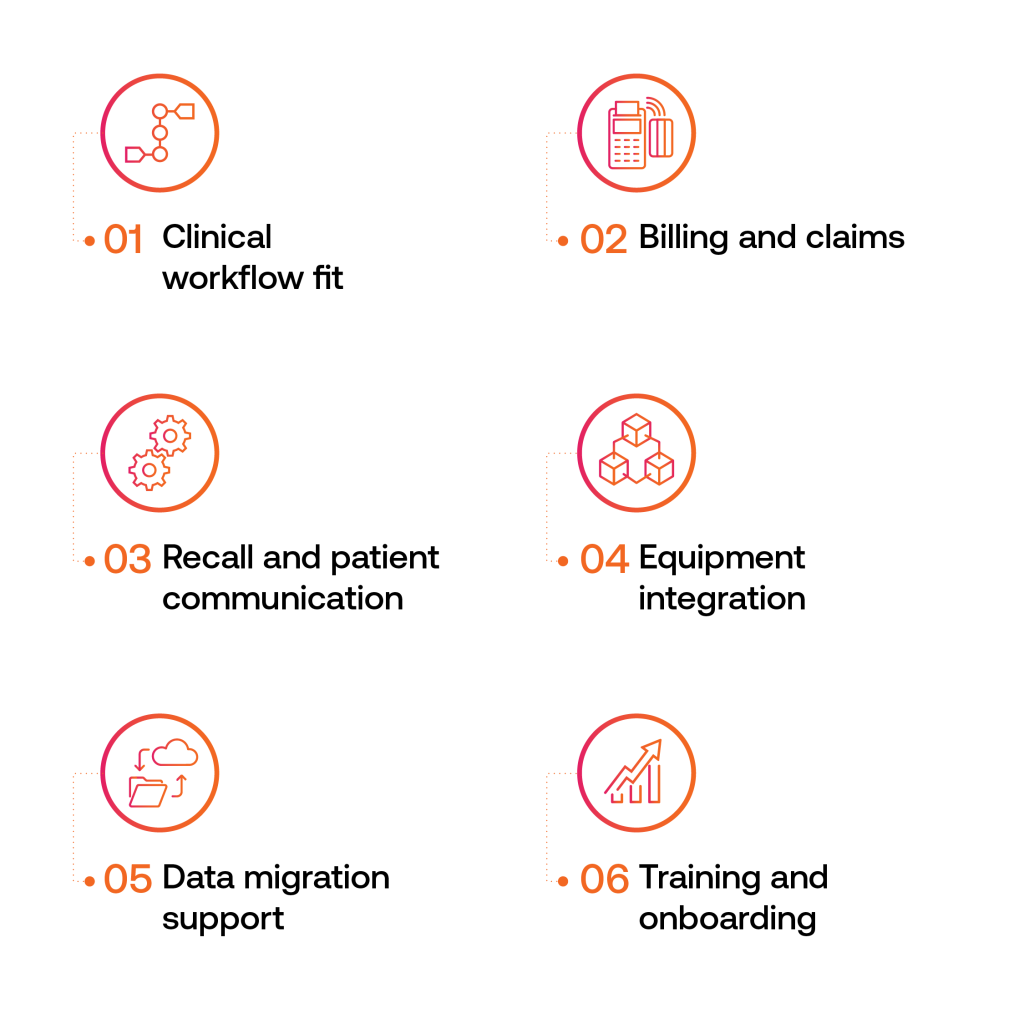
Key things to evaluate:
- Clinical workflow fit — does it handle the full optometry encounter, from pre-test through examination, dispensing, and follow-up, without requiring workarounds?
- Billing and claims — in the US, does it support your payer mix and clearinghouse integrations? In the UK and Ireland, does it handle NHS GOS forms, optical vouchers, and mixed-payer models?
- Recall and patient communication — automated recall by exam type is a core function for an optometry practice; verify it works the way your practice needs it to
- Equipment integration — confirm compatibility with your diagnostic devices before signing
- Data migration support — how does the vendor handle migrating records from your existing system, and what format do they need the data in?
- Training and onboarding — what is included, and how long does a typical practice take to reach full proficiency?
The Migration Process Step by Step
The steps below follow the order most practices work through, from pulling your data out of the legacy system to closing it down for good.
1. Extract and clean your data
Work with your current vendor to export your patient records in a standard format. Most vendors can export to HL7 or CSV; confirm this early as some legacy systems make data extraction difficult, and you may need lead time.
Once exported, review the data for duplicates, incomplete records, and formatting inconsistencies before handing it to the new vendor for import.
2. Configure the new system
Before any patient data goes in, set up the system to match your practice: appointment types, exam templates, dispensing workflows, user roles and permissions, recall intervals, and any custom fields your team uses. Getting this right before go-live prevents the most common source of post-migration frustration, a system that is technically running but does not fit how the practice actually works.
3. Train your team
Training should cover every role that touches the system, not just the clinical team. Reception staff handling scheduling and check-in, dispensing opticians using the frame and lens records, anyone involved in billing or reporting.
Most cloud EHR vendors provide a mix of video resources, live training sessions, and a sandbox environment for practice. Use the sandbox properly, it is much better to make mistakes there than in a live patient record.
4. Validate and test before go-live
Before importing live patient data, complete a full review of your setup to confirm that workflows, templates, and reports function as expected. Use test data or sample records to simulate a typical day: booking appointments, recording exams, dispensing, and running invoices or reports.
This validation step helps you catch any configuration issues early, ensure the team feels confident using the new system, and confirm that everything is ready for a smooth transition on go-live day.
5. Go live and monitor closely
Set a clean go-live date and communicate it clearly to the whole team. In the first two to four weeks, expect questions and edge cases that did not come up in training or validation. Have a clear process for logging issues, and a named person responsible for resolving them.
Most practices reach a stable state within four to six weeks of go-live, after which the day-to-day advantages of the cloud system start to become apparent.
Common Concerns and Honest Answers
A few questions come up in almost every conversation about switching to cloud – here are straight answers to the most common ones.
‘What if the internet goes down?’
It is a legitimate question. Most cloud EHR downtime is caused by local connectivity issues rather than vendor outages: reputable platforms publish uptime guarantees of 99.9% or higher.
The practical mitigation is a backup internet connection: a mobile hotspot or a secondary broadband line costs relatively little and covers the majority of scenarios.
‘Is our patient data safe?’
Cloud vendors operating in healthcare have strong commercial incentives to maintain security, a breach is existential for their business. Most reputable platforms use encryption at rest and in transit, multi-factor authentication, role-based access controls, and geo-redundant backups.
In the US, require a signed BAA. In the UK and Ireland, ask for evidence of UK GDPR or EU GDPR compliance and data processing agreements.
The security question is worth asking carefully, but the assumption that on-premise is inherently safer is not well-founded, local servers are frequently under-patched and under-backed-up in small practices.
‘How long will the transition take?’
For a single-site independent practice, a well-managed migration typically takes eight to sixteen weeks from contract to go-live. Larger or multi-site practices take longer. The variables are data volume and complexity, the quality of data extraction from the legacy system, and how much workflow configuration the new system requires.
Build in more time than you think you need, rushing a migration to hit an arbitrary deadline is one of the most common sources of post-migration problems.
How the Right Software Supports the Transition (and Beyond)
A cloud EHR migration is a chance to build a more consistent, scalable clinical operation. Practices that approach it that way and are using the transition to improve workflows, consolidate tools, and reduce manual processes come out the other side with a system that actively supports growth rather than limiting it.
For independent optometry and optical retail practices operating across the US, UK and Ireland, the platform needs to handle not just clinical records but the full practice workflow: scheduling, dispensing, billing, recall, and reporting across different regulatory and payer contexts.
Online reviews for opticians and patient recall are also built into the patient retention picture, and the right platform supports both.
Acuitas 3 is built specifically for independent optometry and optical retail, covering clinical records, practice management, billing, inventory, and reporting in a single integrated platform, with functionality that adapts to NHS contracts, GOS workflows, private practice models, and US insurance processing.
If you are at the point of evaluating what a cloud-based migration could look like for your practice, see how Acuitas 3 supports independent practices.